
Enter a drug, browse, or paste a list
Query Type:
Paste your list here:
Connect Drugs or Drug Properties
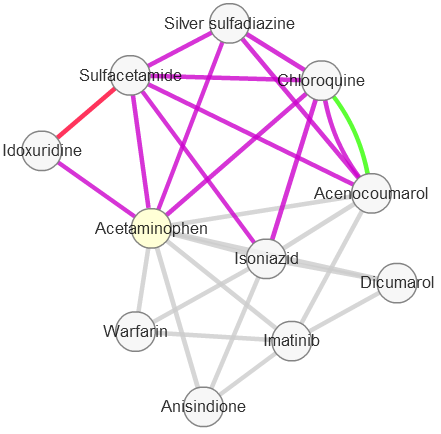

To connect drugs or properties of drugs, Drugs2Networks (D2N) uses an underlying knowledge base made of six drug-drug interaction networks. These networks are created by connecting drugs if pairs of drugs share significant AERS adverse events, or SIDER side effects; Connections are also made if pairs of drugs share similar gene expression signature in CMAP. To reduce the dimensionality of the drug-drug similarity from CMAP we converted sets of differentially expressed genes for each drug to enriched pathways from the KEGG pathway database, or by using our own ChIP-X Enrichment Analysis database (ChEA); We also created a drug-drug similarity network by connecting two drugs if they significantly share ATC codes; The next drug-drug network is based on structural similarity, where similarity is determined based on the drug's 166-key MACCS fingerprint created from the drugs' SMILES strings using ChemmineR. Finally, the last drug-drug network is based on shared targets listed in DrugBank. The AERS, SIDER, KEGG, ChEA, and MACCS drug-drug networks are made based on the shared "properties" of the drugs. These properties can also be connected based on the drugs they share. Drugs2Networks (D2N) contain six property-property networks and users can choose a property to build property-property similarity subnetworks.
Building drug-drug similarity subnetworks
There are two ways to build a subnetwork that connects drugs based on their shared properties: Either by entering one drug, or by entering or pasting lists of drugs.
One drug - Example drug: Acetaminophen (see above figure on the left).
- At the top make sure "Drug" is selected as the query type
- At the bottom choose the connection types that you want to include
- Choose a confidence score between 1 and 0.95 (1 is the most stringent and 0.95 is the least)
- Click Go or Update to run
List of drugs - Example drug list: Sunitinib, Melphalan, Chloramphenicol, Tacrine
- At the top make sure "Drug" is selected as the query type
- Enter several drugs in the query box or click paste list to enter a list of drugs, each on a new line
- At the bottom choose the connection types you want to include
- Choose a confidence between 1 and 0.95 (1 is the most stringent and 0.95 is the least)
- Choose the maximum number of edges to connect the drugs. A max path length of 1 will only identify direct connections between the drugs from the input list. Higher path lengths will pull in additional drugs that fall on paths between the drugs from the input list
- Click Go or Update to run
Building property-property similarity subnetworks - Example property: ALZHEIMERS_DISEASE, or Dizziness (see above figure on the right)
Properties refer to specific elements of the various connection types. For example, "neuropathy" is a property from the AERS derived network of properties, "< 5M RING" is from the MACCS property network. Entering one of these will connect the property to other related properties of the same type. The only way to control the size of the resultant subnetworks is by using the confidence score.
- At the top make sure the "Property" is selected as the query type
- Enter a property in the query box, or browse to select a property
- Choose a confidence score between 1 and 0.95 (1 is the most stringent and 0.95 is the least)
- Click Go or Update to run
Enrichment Analysis
Edges in the drug-drug similarity subnetworks or the property-property similarity subnetworks are created by either shared properties or shared drugs. Thus, for each subnetwork built by Drugs2Networks we automatically compute enrichment of these contributing drugs or properties. P-values for each term are computed using Fisher's Exact Test. Read more about the enrichment analysis computation in the about page.
Additional Information
Additional information about the drugs and the edges can be found by hovering the mouse over the nodes in the network and looking at the space below. Clicking a drug node will link to the relevant DrugBank entry.
